
AI SEO agent case study · page speed
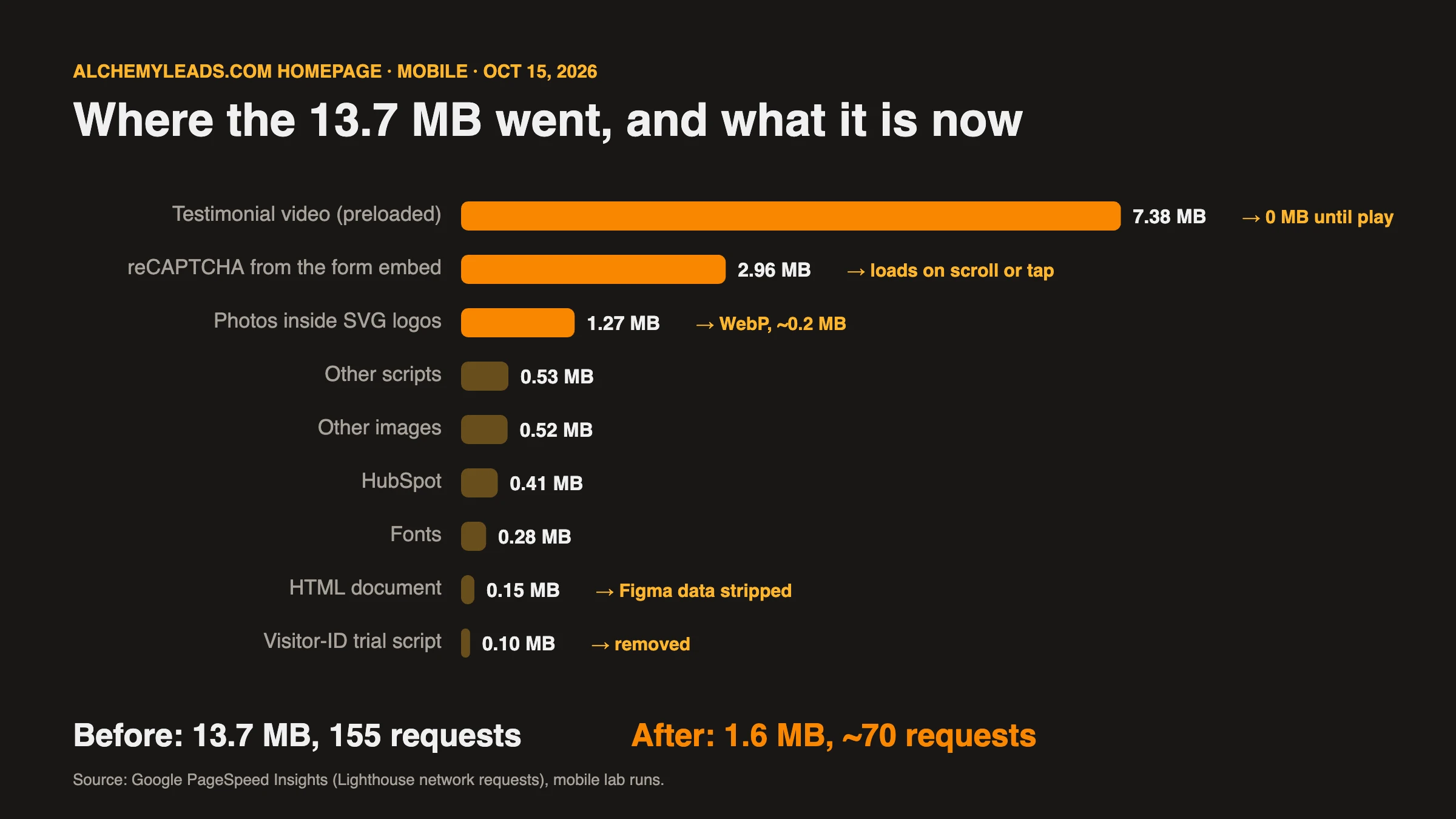
Our homepage scored 31 out of 100 on mobile and downloaded 14 MB. The site is ten years old and has been rebuilt several times, on average every 18 months, so nobody knew everything that was in it. We pointed our AI SEO agent at it on October 15, 2026. By the end of the day the homepage transferred 1.6 MB and scored a median of 78.
The short answerMost of the weight came from things nobody remembered adding: Figma clipboard data pasted into page content, photos hidden inside SVG files, a video that downloaded before anyone pressed play, a form embed that loaded reCAPTCHA eight times, and form plugins running on every page for one hidden form. The agent found each one by measuring the live site, traced it to its source and built a fix that only removes what a page doesn’t use. Our team approved every live change.
Before and after
The homepage, same morning vs same evening
Google PageSpeed Insights, mobile, lab data. Lab scores move between runs, so we report medians and the full range we measured.
Performance score (median)
Page weight
Total Blocking Time (median)
HTML document
| Page | Before (Oct 15, morning) | After | What changed most |
|---|---|---|---|
| Homepage | Score 31–42 · LCP 4.5–14.1 s · TBT 780–2,800 ms · 14 MB | Median score 78 (48–88) · median TBT 152 ms · 1.6 MB | 7.5 MB video no longer preloads, reCAPTCHA loads on demand, 1.8 MB of client logos now 0.3 MB |
| About | 860 KB of HTML, 582 KB of it Figma data · score 57–64 after the first pass | 271 KB of HTML · median score 80 (60–85) · layout shift 0.155 → 0.001 | Figma data stripped, team portraits 1.5 MB → 80 KB, hero image no longer lazy-loaded |
| SEO services | 451 KB of HTML, 164 KB of it Figma data | 279 KB of HTML · median score 75 (60–87) | Shared section cleaned, contact form plugins gone |
Before: two mobile runs on the morning of October 15, 2026. After: five to seven mobile runs per page between 2 pm and 6 pm the same day, reported as the median with the range in brackets. Server response time was about 150 ms in every run, so the host was never the bottleneck.
Inputs
What the agent worked from
Speed work goes wrong when it starts from a checklist. The agent started from measurements of this site.
Lab data
PageSpeed Insights
Full Lighthouse reports through the PageSpeed Insights API: the LCP element and its delay, every network request by size, CPU time per script, render-blocking files and request chains.
Inventory
The live HTML
Every script and stylesheet on the page, fetched as a logged-out visitor, then traced back to the WordPress plugin, code snippet, theme file or tag manager that adds it.
Site-wide
A crawl of all 257 URLs
HTML size per page, hidden pasted data, which pages actually use a form, a video, a slider or comments, and every SVG image with a photo inside it.
What it found
Eight things slowing our site down
- 5.2 MB of Figma data hidden in page contentWhen text is copied out of Figma and pasted into a page builder, the clipboard can carry the whole Figma selection along as an invisible attribute. Ours added 170 KB to the homepage, 582 KB to the About page and 164 KB to every service hub, across 49 pages. Visitors never saw it, but every one of them downloaded it.
- Photos wrapped inside SVG files26 client logos and team portraits were exported from a design tool as SVG files with a full PNG embedded inside. One 204 × 200 logo weighed 418 KB. The logo strip alone, on 28 pages, was about 1.8 MB.
- A testimonial video downloading on page loadA 37-second client testimonial downloaded 7.5 MB on every homepage visit, before anyone pressed play.
- reCAPTCHA loaded eight timesOur HubSpot form embed pulled in reCAPTCHA, which Lighthouse saw as eight 347 KB downloads and 3.4 seconds of CPU time. That one script accounted for more blocking time than everything else on the page combined.
- Form plugins on every page for one hidden formContact Form 7 and three add-ons loaded their CSS and JavaScript on all 257 pages. The only CF7 form left on the site sat on the blog page, hidden at every screen size. Four older posts still embedded a CF7 form that had been deleted, so visitors saw “Error: Contact form not found.”
- A stylesheet chain built in an older version of the themeThe child theme’s stylesheet imported a 163 KB copy of an older theme stylesheet, which loaded an old icon font, and a Google Fonts file. Because they were imports, the browser had to fetch them one after another before showing anything.
- Scripts nobody needed on most pagesThe video player library loaded on pages with no video, the comment-reply script on a site with comments turned off, and the emoji polyfill on every page.
- A trial tracking script still runningA visitor-identification script we had been trialing was still live, and it pulled in a third-party identity script of its own. We decided it wasn’t worth it, switched it off and updated our privacy policy the same day.
How to
How each fix works
The technical detail, for anyone who wants to run the same checks on their own WordPress site.
1. Measure before touching anything
Pull the full Lighthouse JSON from the PageSpeed Insights API. The score is the least useful part of it. The parts that told us where to look:
lcp-breakdown-insight: which element is the LCP and how long its render delay is. Ours was the homepage H1, held back by render-blocking CSS.network-requestssorted bytransferSize: the 7.5 MB video and the eight reCAPTCHA copies were the top nine rows.bootup-time: CPU time per script. reCAPTCHA 3,412 ms, the theme’s slider script 1,373 ms, Rocket Loader 1,123 ms.network-dependency-tree-insight: request chains. This is where the stylesheet → old stylesheet → icon font chain showed up.server-response-time: 150 ms. That ruled out the host before anyone spent time in server logs.
Run each page at least twice. Our homepage scored 31 and then 42 on back-to-back runs with nothing changed.
2. Inventory every script, then find where it comes from
Fetch the page as a logged-out visitor (logged-in users skip the page cache and get extra admin assets) and list every <script>, <link> and <style> with its id, source, type and position. Our homepage had 49 scripts. Then trace each one:
- A plugin’s assets live under
/wp-content/plugins/<slug>/, so the path names the plugin. - Code snippet plugins need their code searched directly. WPCode’s admin search only matches snippet titles, so the agent opened each snippet and searched its code for the script’s hostname.
- Scripts with
type="text/plain"and a consent attribute are held by the consent manager until a visitor opts in. They still run in Lighthouse if your default is opt-in for US visitors. - Scripts with a rewritten type like
type="9ee35…-text/javascript"are being handled by Cloudflare Rocket Loader.
3. Scan every page on the site
The homepage told us what was heavy. A scan of all 257 sitemap URLs told us where each feature was actually used, which is what makes it safe to remove an asset from the pages that don’t need it. Per page we recorded HTML size, bytes of pasted Figma data, whether a CF7 form, HubSpot form, video, slider or comment form rendered, and every SVG under /uploads/. Then each SVG was checked for an embedded image:
const svg = await fetch(url).then(r => r.text());
const hasRaster = /data:image\/(png|jpe?g|webp)/.test(svg);
4. Strip pasted Figma data
The pasted data sits in attributes like data-buffer="<!--(figma)…" and data-metadata="<!--(figmeta)…". One regular expression removes it from the final HTML on every page:
$html = preg_replace( '/\sdata-(?:buffer|metadata)="(?:<|<)!--\(fig[^"]*"/i', '', $html );The better long-term habit is pasting into the builder as plain text (Cmd+Shift+V) so the data never gets saved in the first place.
5. Turn photos-in-SVG back into real images
The agent rendered each SVG in a browser canvas at twice its display size and exported it as WebP, then compared every original and converted logo side by side before uploading anything:
const img = new Image();
img.src = URL.createObjectURL(new Blob([svgText], { type: 'image/svg+xml' }));
await img.decode();
const c = document.createElement('canvas');
c.width = w * 2; c.height = h * 2;
c.getContext('2d').drawImage(img, 0, 0, c.width, c.height);
const webp = await new Promise(r => c.toBlob(r, 'image/webp', 0.86));
26 files went from about 3.4 MB to about 430 KB, with transparency kept. A 2× WebP has double the pixel size of the SVG it replaces, so any <img> tag without width and height attributes gets the SVG’s original dimensions added. Every logo was then measured on the live page at the same size as before.
6. Stop videos downloading before play
Set preload="none" and give the video a poster frame. The agent captured each poster from the video itself by seeking two seconds in and drawing the frame to a canvas, about 28 KB each:
<video preload="none" poster="/wp-content/uploads/2026/10/poster.webp" …>The homepage stopped downloading 7.5 MB on load. The video still starts as soon as someone presses play.
7. Load the form, and its reCAPTCHA, when it’s needed
The HubSpot embed script is removed from the HTML and each hbspt.forms.create() call is wrapped in a queue. A small loader fetches the embed on the visitor’s first scroll, tap or keypress, or straight away if the form is within 400 px of the screen:
var q = window.alHsQ = window.alHsQ || [], go = false;
function load() {
  if (go) return; go = true;
  var s = document.createElement('script');
  s.src = 'https://js-na2.hsforms.net/forms/v2.js';
  s.onload = function () { var f; while ((f = q.shift())) f(); q.push = function (fn) { fn(); }; };
  document.head.appendChild(s);
}
['scroll', 'pointerdown', 'keydown', 'touchstart', 'mousemove'].forEach(function (e) {
  addEventListener(e, load, { passive: true });
});
new IntersectionObserver(function (es) { if (es.some(function (x) { return x.isIntersecting; })) load(); },
  { rootMargin: '400px' }).observe(document.querySelector('#hubspotForm'));
On pages where the form sits near the top, like our call booking page, it still loads right away. Turning off the form’s reCAPTCHA would have made that page faster, but we kept it on. The form is how prospects reach us, and we chose security over the extra speed.
8. Remove assets only where they aren’t used
All of the fixes above run in one WordPress output filter. It sees the finished HTML for each logged-out page view, so every removal can check what the page actually contains:
if ( false === strpos( $html, 'class="wpcf7-form' ) ) {
    // no Contact Form 7 form on this page: drop CF7 and its add-ons' CSS and JS
}
if ( ! preg_match( '/<(?:video|audio)\b/i', $html ) ) {
    // no media: drop the MediaElement player
}
if ( false === strpos( $html, 'comment-respond' ) ) {
    // no comment form: drop comment-reply.js
}
Editors and the page builder see the page untouched, and turning the snippet off and clearing the cache undoes everything. Once the dead form embeds were removed from the four old posts, Contact Form 7 and five other unused plugins were switched off entirely.
9. Break the stylesheet chain without changing a pixel
Removing the old imported stylesheet looked tempting. The agent tested it first by comparing the computed style of every element with and without it, and 40 elements changed, including icons on buttons. So it stayed. Instead, the child stylesheet is served without its @import lines and the imported files are linked directly in the same order, so the browser fetches them in parallel and the cascade is identical:
<link rel="stylesheet" id="x-child-stack-css" href="…/pro-child/framework/css/dist/site/stacks/integrity-light.css">
<link rel="stylesheet" id="x-child-css" href="…/uploads/al-speed/pro-child-style-1765176863.css">
The same computed-style comparison on three pages (1,799, 1,157 and 961 elements) found zero differences. Cloudflare Fonts then served the Google Font from our own domain with font-display: swap.
10. Defer every script, keep the order
To retire Rocket Loader we needed our own way to stop scripts blocking the page. External scripts get defer. Inline scripts can’t be deferred directly, so each one becomes a deferred data: URI. Deferred scripts run in document order after the HTML is parsed and before DOMContentLoaded, so jQuery still runs before its plugins, and data a script reads is still defined before that script runs:
// inline script → deferred, same position, same global scope
'<script defer data-cfasync="false" src="data:text/javascript;base64,' . base64_encode( $code ) . '"></script>'
Left alone: JSON-LD, speculation rules, modules, consent-gated tags and the consent manager, which has to run first. data-cfasync="false" tells Rocket Loader to skip each script. The site has no Content-Security-Policy that blocks data: scripts and no document.write, the two things that would have ruled this out.
Two things went wrong in testing, and both are worth knowing before you try this:
- Filter order broke consent gating. Our consent controller also rewrites the HTML on output, turning marketing tags into inert
text/plainuntil a visitor opts in. It recognizes tags by their code. Our deferral ran first, base64-encoded the inline code, and the consent controller no longer recognized it, so on test requests the ad pixel and a retired tracker loaded without consent. The fix was to run deferral in its own output buffer started earlier (WordPress priority -1000, one step before the consent controller’s -999), which makes it the outermost buffer and therefore the last to run. Output buffers unwind from the inside out, so the one you start first runs last. Normal visitors never saw the bug, because it only ran behind a test flag. - Deferred decoration caused layout shift. Two of our own scripts insert decorative dividers and widgets on
DOMContentLoaded. Once everything was deferred, the first paint could land before those inserts, and the logo strip jumped by up to 0.41 CLS. Those two scripts need no library, so they now stay inline at the end of the page and run their handlers immediately, before first paint. CLS dropped to 0.006–0.010, lower than the 0.065 the live site had been showing.
The agent then checked the homepage, About, blog, call page, glossary search, PPC keyword tool and AI query classifier for console errors and working interactions with deferral on.
11. Test like you mean it
- Ship behind a flag. Every change went live first behind a URL parameter, so only test requests saw it. Regular visitors kept the old page until the change was verified.
- Verify logged out. A separate browser with no WordPress login checked console errors, image sizes, the video player and the form on every changed page type.
- Compare fairly. Our host bypasses the page cache for URLs with query strings, so A/B runs used query strings on both sides.
- Use medians. Three or more runs per side, alternating A and B, because single lab runs swung by 20+ points.
A judgment call
The Rocket Loader experiment
Cloudflare Rocket Loader cost about 1.1 seconds of CPU on its own, so switching it off looked like an easy win. The data said otherwise. With Rocket Loader off and nothing else changed, Total Blocking Time went down, but first paint slowed to 4.5–8 seconds in 6 of 12 test runs, against 1 of 7 with it on, because jQuery in the page head started blocking rendering. The median score dropped from about 76 to about 64, so we switched it back on the same afternoon.
With every script deferred and the layout shift fixed, we ran Rocket Loader against our own deferral in alternating runs, three per side on three pages. Medians: homepage 86 vs 79, About 80 vs 77, SEO services 75 vs 76. Our deferral cut blocking time on two of the three pages (202 → 109 ms and 234 → 91 ms) but painted the largest element a little later. It came out even, so we kept Rocket Loader on and left our own deferral switched off.
Agent plus team
How the work split
The agent
Measured, traced and built
Flagged the 31/100 score with our own PageSpeed tool, inventoried 49 scripts, crawled 257 pages, traced every asset to its source, built the fixes, tested them against saved pages and on the live site behind test flags, and measured the result.
The team
Decided and approved
Decided the trial tracking script wasn’t worth keeping, approved each live change by number, chose to keep a security plugin and an old form inbox, and chose to keep reCAPTCHA on the form, favoring security over speed.
Together
Verified and kept
Every change is reversible in one step, documented with its media and snippet IDs, and turned into a reusable skill the agent now runs on client sites.
What’s next
Still on the list
- The call booking pageIt still scores in the 15–24 range because its form, and the form’s reCAPTCHA, sit at the top of the page. Changing the form’s CAPTCHA setting is the fix.
- Real-user dataLab scores are a simulation. Chrome’s real-user data for our domain updates over a rolling 28 days, and the agent will report the field trend once enough visits are counted.
- Retiring Rocket LoaderOur own script deferral is built, tested and consent-safe. The theme’s slider script still costs about a second of CPU on mobile, and trimming it is the next step before deferral pulls clearly ahead of Rocket Loader.
- The theme’s old stylesheet copyIt still loads because 40 elements depend on it. Moving those few rules into the current theme would let it go.
FAQs
Straight answers
How much faster did alchemyleads.com get?
On October 15, 2026 the homepage scored 31 and 42 in two mobile PageSpeed Insights runs and transferred 14 MB. After the fixes it transfers 1.6 MB and scores a median of 78 across seven mobile runs, with median Total Blocking Time down from 2,800 ms to 152 ms.
What was making a WordPress site that slow?
Mostly things nobody remembered adding: 5.2 MB of hidden Figma clipboard data pasted into page builder content across 49 pages, photos wrapped inside SVG files, a testimonial video that downloaded 7.5 MB on page load, a form embed that loaded reCAPTCHA eight times, and contact form plugins loading on every page for a single hidden form.
Did the AI SEO agent change the site by itself?
No. The agent measured the site, traced every script to its source, found the problems and built and tested the fixes. Our team approved each live change by name, made the judgment calls and verified the results.
Is it safe to defer every script on a WordPress site?
It can be, if order is preserved. Deferred scripts run in document order after the HTML is parsed, so converting inline scripts to deferred data URIs keeps dependencies like jQuery intact. Leave non-JavaScript types, consent managers and module scripts alone, and test every interactive page before going live.
Should I turn Cloudflare Rocket Loader off?
Measure first. On our site, turning it off without deferring scripts made first paint slower in half of our test runs. With every script deferred by our own code, the two came out roughly even, so we kept Rocket Loader on and will test again after removing more scripts.
Your site next
See what’s slowing your site down
We’ll run the same measurements on your site and show you what’s actually in it, what to remove and what to keep.
Suggested

The Cost of Inaction in Manufacturing Lead Generation: What Five Missed RFQs a Month Cost in 15 Industries
What five missed RFQs a month cost in 15 manufacturing industries, with customer lifetime values, a conservative 15 to 20% close rate, and a cost of inaction calculator.
October 27, 2026

How to Get Cited by ChatGPT, Perplexity and Google AI Mode
How ChatGPT, Perplexity and Google AI Mode choose sources, which crawlers to allow, and a five-step plan to get your company cited, based on official docs.
October 26, 2026
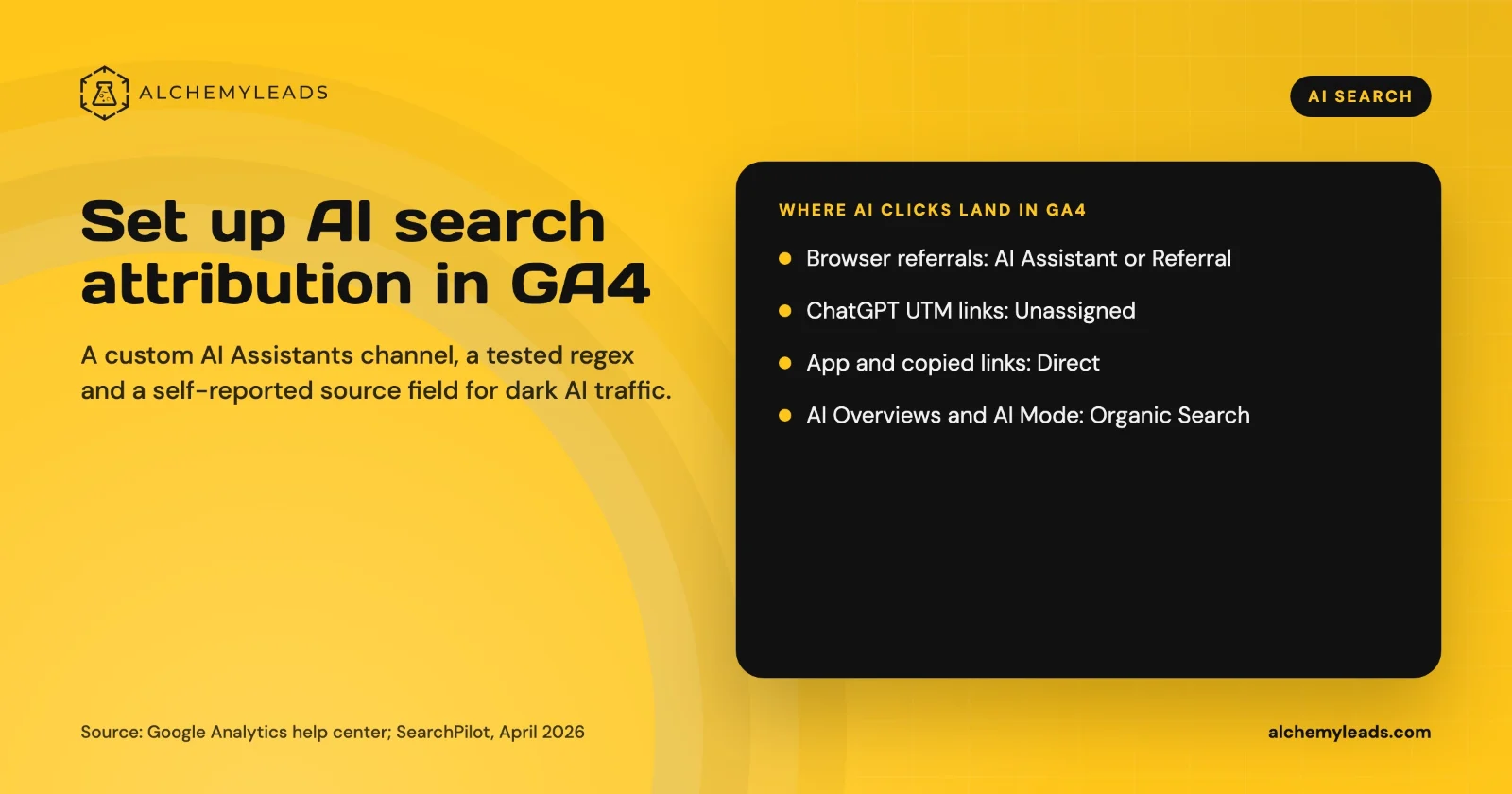
How to Set Up AI Search Attribution in GA4: A Step-by-Step Guide for 2026
Step-by-step GA4 setup for AI search attribution: an AI Assistants channel, a copy-paste regex, ChatGPT UTM fixes and a self-reported AI source field.
October 26, 2026

Voice Search in 2026: How AI Assistants Pick Their Sources
We first wrote about voice search in 2022, when the question was whether “Hey Siri” and “OK Google” would change how people shop. Four years later, voice is back in a bigger form. People now talk to ChatGPT, Gemini, Siri, Alexa+ and Copilot the way they talk to a knowledgeable friend, and those assistants answer by reading the web in
October 17, 2026
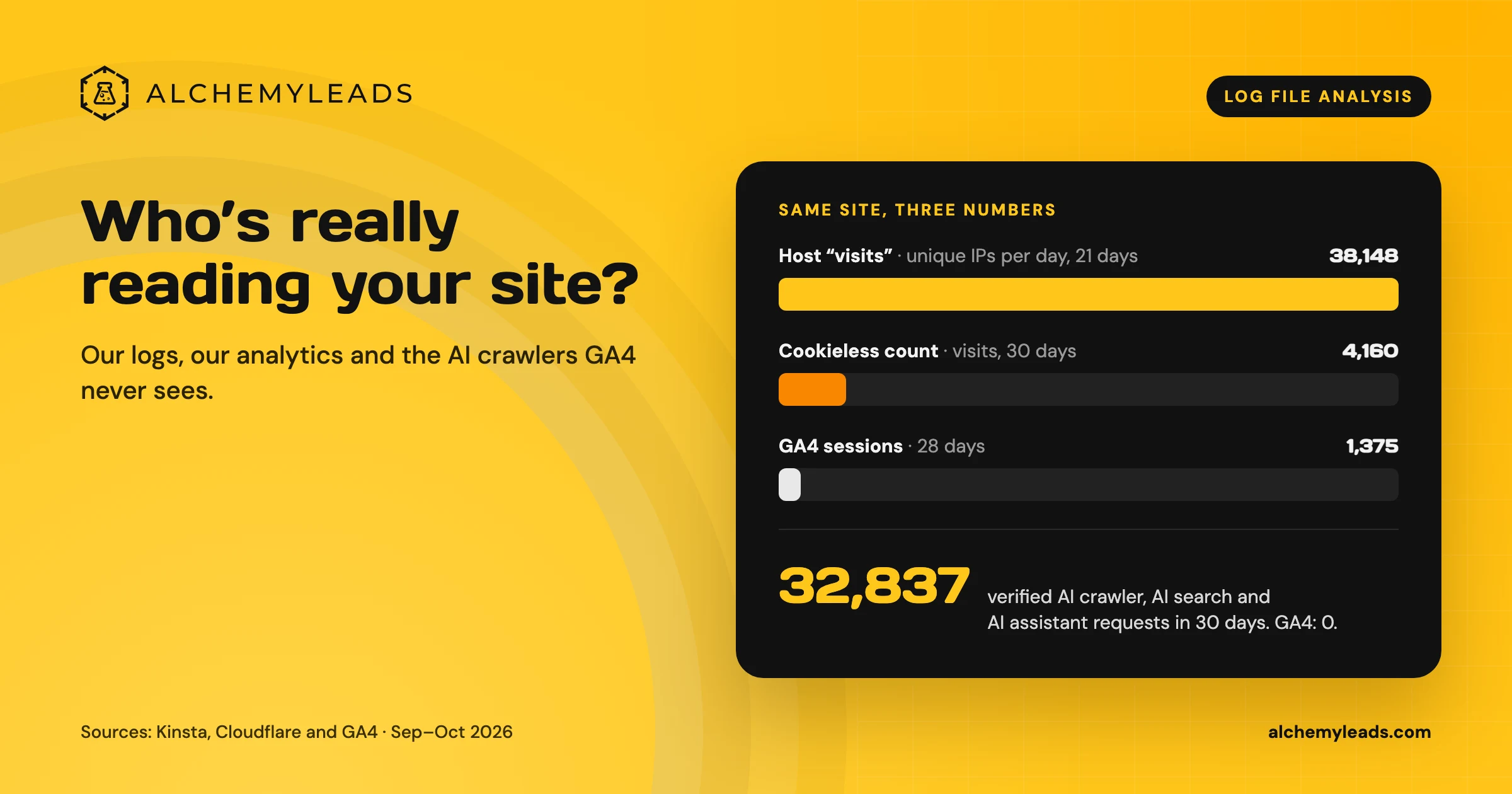
Log File Analysis for AI Search: Our Logs Showed 38,148 Visits. GA4 Showed 1,375.
Our host logged 38,148 visits. GA4 logged 1,375 sessions. We opened the server logs to see who was really there, and what AI crawlers read.
October 16, 2026
Contact us
We value your privacy and won't share your email with others.
We'll only contact you with curated content.
