
Here’s the thing about ecommerce: you spend a fortune acquiring customers, and then they ghost you. No explanation. No goodbye. Just radio silence.
The good news? Most haven’t sworn off your brand forever. They’re just distracted. And bringing them back costs way less than finding new customers (we’re talking 5x cheaper). This guide shows you exactly how to create win-back customer segments in Shopify that actually work. You’ll learn the RFM framework for prioritizing which customers to target first, how to build segments using ShopifyQL, and the specific queries that turn lapsed buyers into repeat customers.
Let’s get your customers back.
Types of Lapsed Customers You’ll Target
Not all inactive customers are created equal. Some bought once as a gift and were never coming back anyway. Others were loyal fans until life got in the way. Your job is knowing the difference.
Behavioral lapse customers include one-time buyers who tested your product then vanished, and previously loyal customers who ordered regularly then stopped. The first group needs education and incentive. The second needs gentle reminders and appreciation.
High-value customers with extended absence are your VIPs who haven’t ordered in their typical buying cycle. When someone who spent $2,000 with you goes quiet, you need to know immediately.
Seasonal buyers outside their typical cycle bought Valentine’s gifts last February but are radio silent this year. The calendar is your trigger, and customer segmentation makes this trackable.
Cart abandoners who never completed purchase showed intent even though they’re not technically customers yet. An abandoned cart email with the right discount code can seal the deal, especially if you catch them within 24 hours.
Each type needs different messaging, different incentives, and different timing. The mistake most stores make? Treating them all the same.
Determining “Inactive” for Your Business
A candle company with 60-day replenishment cycles has a completely different definition of “lapsed” than a furniture store where customers buy once every three years. Using arbitrary timeframes means you’re either pestering happy customers too early or reaching out to lost causes too late.
Calculate Your Average Buying Cycle
Pull your order history from the past six months. Look at customers who’ve made at least two purchases. Calculate the days between their orders. Take the average. That’s your baseline.
Now multiply by 1.5. That’s when someone becomes “at-risk.” Multiply by 2, that’s “definitely lapsed.”
So if your average is 60 days:
- 90 days = at-risk (early intervention time)
- 120 days = lapsed (serious win-back campaign needed)
- 180+ days = deep lapse (last-chance territory)
Industry Benchmarks for Context
Consumables (coffee, supplements, pet food): 30-60 day cycles. Consider someone lapsed at 75-90 days.
Fashion and apparel: 90-120 day cycles. Lapsed at 150-180 days.
Furniture and home goods: 180-365 day cycles. Lapsed at 400+ days.
Your business is unique. Use your data, not generic advice.
The RFM Prioritization Framework
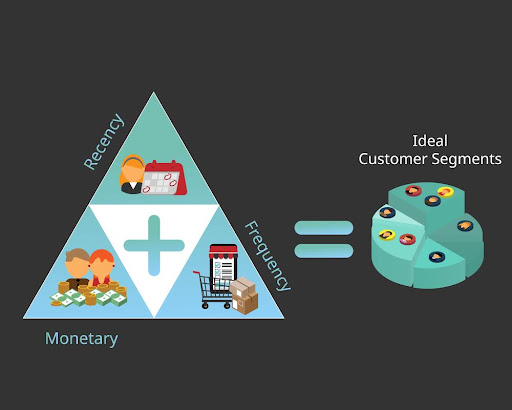
RFM stands for Recency, Frequency, Monetary. It’s how you figure out which lapsed customers are worth chasing first. You can’t target everyone at once. You’ll burn out, your email marketing strategy will suffer, and you’ll dilute your efforts. Smart segmentation means smart prioritization.
R (Recency): How long since their last purchase
This is your primary trigger. Someone who bought 61 days ago is different than someone who bought 365 days ago. The more recent, the easier the win-back. Customer engagement drops exponentially over time.
At 60 days, they might still have your product in their house. They remember the experience. At 365 days? You’re a distant memory competing with whoever they buy from now.
F (Frequency): Historical Order Patterns
A customer with ten orders has proven loyalty. They know your products work. They trust you. Getting them back is usually a matter of reminder, not convincing.
A customer with one order? That’s a harder sell. You’re essentially re-converting them from scratch. Different email content, different approach, different expectations.
M (Monetary): Lifetime Value and Average Order Value
This is where you decide who gets the white-glove treatment versus who gets the automated email campaign. Someone who’s spent $5,000 with you deserves a personal note from your founder. Someone who spent $30 once? They get the standard discount code.
Customer Lifetime Value directly determines your win-back budget. If someone’s CLV is $500 and your margin is 40%, you can justify spending $200 on reactivation costs.
Priority Matrix: Which Segments to Create First
Priority 1: High M, High F, Medium R (60-90 days) = VIP Win-Back
These are your best customers who recently went quiet. Maybe they’re testing a competitor. Maybe they forgot. This segment has the highest ROI per email sent. Even a 20% reactivation rate here can add meaningful revenue.
Priority 2: Medium M, High F, Medium R = Loyal Customer Retention
Not quite VIPs but they were regulars. Five to ten orders, solid Average Order Value, but now they’ve been gone for 90-120 days. This is churn prevention. Catch them before the habit breaks permanently.
Priority 3: Low M, Low F (1 order), High R (90+ days) = One-Timer Conversion
Your largest segment by volume. Most ecommerce stores have 40-60% one-time buyers. Low individual value, but massive cumulative revenue potential. The goal isn’t getting rich off each reactivation. It’s converting these into Priority 2 customers over time.
Priority 4: Any M/F, Very High R (180+ days) = Deep Lapse Recovery
Many of these are gone forever. But not all. Some just needed a really long time. Your best bet here is your strongest offer and a “last chance” angle. If they don’t respond to this, accept the loss and focus elsewhere.
Shopify Segmentation Basics
Before you start building segments, you need to understand how Shopify’s system works. The segments are dynamic, they auto-update as customer behavior changes, and once you grasp the fundamentals, you’ll be creating customer segments faster than you can write subject lines.
How Shopify Segments Work
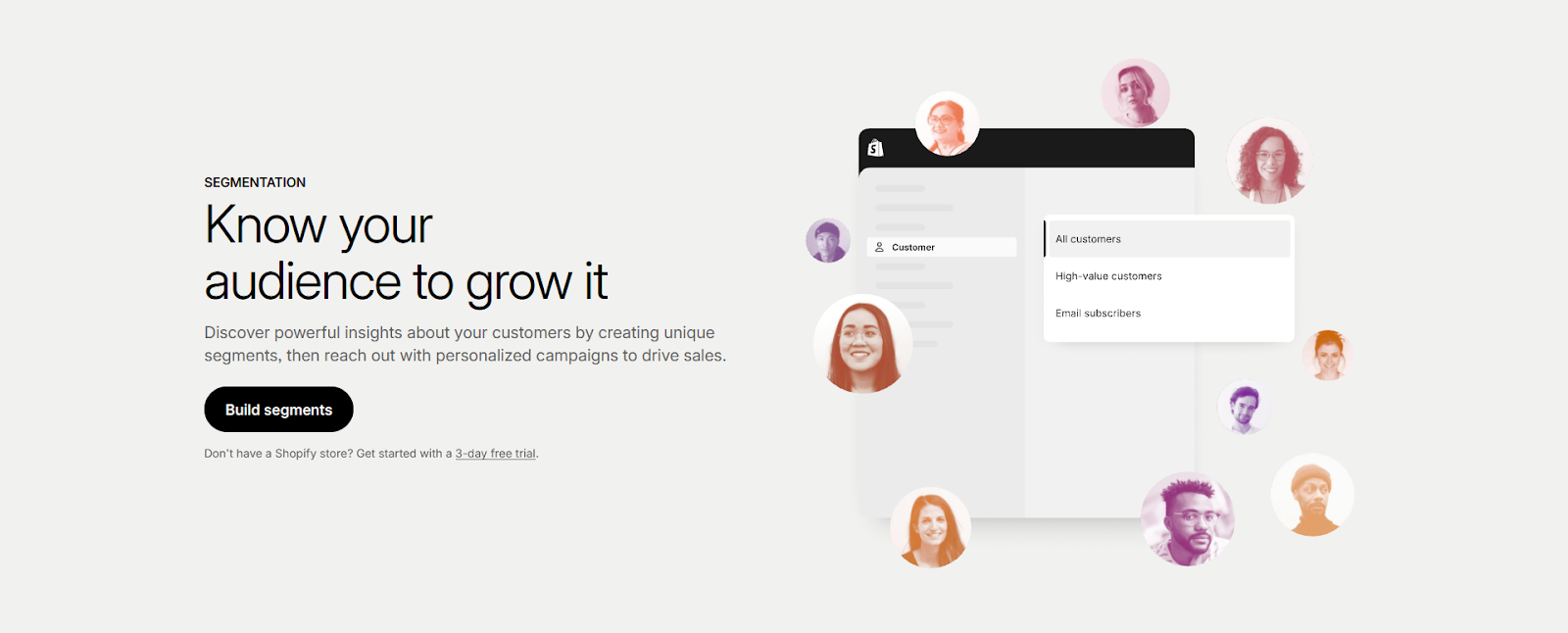
Shopify segments are alive. Create a segment for “customers who haven’t purchased in 90 days,” and Shopify automatically adds people as they cross that threshold. Remove people when they buy again. No manual updates, no spreadsheet exports, no watching lists go stale.
This is huge for winback automations. Set up your segment once, connect it to Shopify Email or your email marketing app, and the whole machine runs itself. Customers flow in, campaigns trigger, some convert back. The ones who don’t? They stay in the segment until they either buy or you decide to give up.
Static lists die. Dynamic segments scale.
ShopifyQL Overview
ShopifyQL is basically filtered search with a fancy name. The structure looks like this:
FROM customers
SHOW customer_name, orders, amount_spent
WHERE [your filters go here]
ORDER BY updated_at
The FROM and SHOW parts are automatic. Your job is filling in the WHERE clause, which is just picking filters from dropdowns. Think of it like building a sentence: “Show me customers WHERE last order date is more than 90 days ago AND they’ve spent more than $100.”
Essential Filters for Win-Back Segments
last_order_date , Primary filter for lapsed status (e.g., last_order_date <= -90 days)
orders_count , Distinguishes first-timers from repeat buyers (e.g., orders_count = 1 or orders_count >= 5)
amount_spent , Identifies high-value customers (e.g., amount_spent > 500)
products_purchased , Product or tag-specific targeting using CONTAINS (e.g., products_purchased CONTAINS ‘tag:skincare’)
Geographic data , country, state_province_code, city for regional promotions
Accessing Segments
Navigate to Shopify Admin → Customers → Segments. You’ll see any existing segments plus templates to get started. The interface has two modes: visual editor (point and click) and query editor (for people who like seeing the code). Both do the same thing.
Creating Win-Back Segments: Step-by-Step

You’ve got two options: use Shopify’s pre-built templates for speed, or create custom segments for precision. Different situations call for different approaches.
Method 1: Using Pre-Built Templates (Fastest)
If you’re new to customer segmentation or just want to move fast, templates are your best friend.
Navigate to Customers → Segments → Templates icon. Type “haven’t” in the search box. Shopify will surface templates like “Customers who haven’t purchased in 90 days.”
Select the template closest to your needs. The filters populate automatically. You’ll see something like WHERE last_order_date <= -90 days.
Customize timeframe and values. Change that -90 days to match your buying cycle. Add additional filters to narrow it down. Want only customers who’ve spent over $100? Add amount_spent > 100. Want to exclude one-time buyers? Add orders_count >= 2.
Test with “Run query.” Click the Run button. Shopify shows you exactly how many customers match your criteria. If you see 50,000 customers, your segment is too broad. If you see 12, it’s too narrow. Win-back segments typically contain 2-10% of your total customer base, though this varies by business model.
Save segment. Give it a descriptive name like “VIP_60d_Winback” or “OneTime_Buyers_90d”, review the AI-generated description, and you’re done.
Common templates to start with:
- “Customers who haven’t purchased in 90 days” (adjust timeframe to match your business)
- “First-time buyers who never returned” (typically your largest volume segment)
- “High-value customers” (cross-reference with last_order_date to find lapsed VIPs)
Method 2: Building Custom Segments (Most Powerful)
Custom segments let you target exactly who you want, exactly when you want, with surgical precision.
Navigate & Create. Go to Customers → Segments → “Create segment.” Name it clearly right away: “VIP_60d_Winback” or “Skincare_Lapsed_120d.” In three months you’ll have twenty segments and zero memory of what “Segment 7” means.
Build Your Query. Here are six proven queries you can copy-paste and customize:
Example 1: High-Value 60-Day Lapsed (Priority 1)
WHERE amount_spent > 500
AND last_order_date <= -60 days
AND orders_count >= 3
Use case: Your most valuable customers who’ve gone quiet. These are the people who proved they love your products by ordering repeatedly and spending significantly.
Typical segment size: 2-5% of your customer base, depending on your price points and retention rates.
Campaign approach: VIP treatment all the way. No generic discount codes. Instead: personal email from founder, exclusive early access to new products, handwritten note with next order, invitation to private customer advisory group.
Expected metrics: 25-40% reactivation rate based on typical ecommerce benchmarks, though results vary by industry and offer strength. These customers want to come back. You just need to remind them why they loved you in the first place.
Example 2: Loyal Customers At-Risk (Priority 2)
WHERE orders_count >= 5
AND last_order_date <= -90 days
AND amount_spent > 200
Use case: Prevent churn before it becomes permanent. These customers have a proven track record (five-plus orders) but they’re approaching or past their typical buying cycle.
Typical segment size: 5-10% of customer base.
Campaign approach: “We noticed you haven’t ordered lately” messaging. Gentle, appreciative, curious rather than pushy. Offer a Customer Loyalty Group perk (early access, bonus points, special pricing tier).
Expected metrics: 15-30% reactivation rate in typical campaigns. Higher if you catch them at 90 days, lower if you wait until 150+.
Example 3: One-Time Buyers 90-Day (Priority 3)
WHERE orders_count = 1
AND last_order_date <= -90 days
Use case: Convert one-timers to repeat customers. This is your largest segment by sheer volume. Most ecommerce stores have 40-60% one-time buyers sitting in their customer data doing nothing.
Typical segment size: 30-40% of total customers.
Campaign approach: Education first, discount second. They bought once, so they know your product works. But they don’t know what else you offer. Your Win Back Email Flow should focus on product discovery. “If you liked [product they bought], you’ll love [complementary product].”
After two educational emails with zero response, then you bring out the discount code. Make it time-limited (7 days) and meaningful (15-20% off).
Expected metrics: 8-15% reactivation rate across most industries. Lower than VIPs, but multiply that by your segment size and you’re looking at serious recovered revenue.
Example 4: Product Category-Specific Win-Back
WHERE products_purchased CONTAINS ‘tag:skincare’
AND last_order_date <= -120 days
AND orders_count >= 1
Alternative syntax (using product ID):
WHERE products_purchased CONTAINS ‘product_id:12345’
AND last_order_date <= -120 days
AND orders_count >= 1
Use case: Target customers who bought specific products or collections. Someone who bought skincare hasn’t shown interest in your haircare line yet.
To find your product ID, check your product URL in Shopify admin or use product tags for broader category targeting. The tag approach (tag:skincare) works well for grouping related products.
Campaign approach: “New arrivals in [category you actually bought]” performs infinitely better than generic product blasts. Include Product(s) Purchased data in your email service provider to dynamically insert relevant recommendations.
Expected metrics: 12-20% reactivation rate because relevance drives clicks.
Example 5: Geographic + Lapsed Combo
WHERE country = ‘United States’
AND state_province_code = ‘CA’
AND last_order_date <= -90 days
AND amount_spent > 100
Use case: Regional promotions, local warehouse shipping offers, or market-specific messaging. Maybe you just opened a warehouse in Texas and can now offer 2-day shipping.
Campaign approach: Lead with the local angle. “Now shipping from our new California warehouse” creates urgency and relevance that generic emails can’t match.
Expected metrics: 10-18% reactivation rate, higher if you’ve got a genuine local value proposition.
Example 6: Email Subscribers Who Lapsed
WHERE email_marketing_state = ‘subscribed’
AND last_order_date <= -60 days
AND orders_count >= 1
Use case: Target customers who remain on your email list but haven’t purchased recently. These are warm leads, they’re still paying attention to some degree.
Important note: Shopify’s native segments don’t track individual email opens or clicks. To target truly engaged email subscribers (those who’ve opened or clicked recent emails), use your email marketing platform’s (Klaviyo, Omnisend, etc.) segmentation instead and sync those segments to Shopify. This query simply ensures you’re targeting subscribed customers who remain on your email list.
Campaign approach: Address why they’re browsing but not buying. Maybe they’re price-sensitive (offer payment plans or financing). Maybe they’re overwhelmed by options (send curated “staff picks” instead of full catalog). Test different messaging approaches.
Expected metrics: 15-25% reactivation rate because you’re working with subscribers who opted in, not cold contacts.
Test Your Segment. Click the Run button. Shopify processes your filters and shows you two critical pieces of data: customer count (above the editor) and a sample customer list (below). Scroll through the sample. Click a few customer profiles. Verify they actually match your intent.
Refine if Needed. Too many customers? Tighten your criteria. Too few? Loosen them. Wrong customers showing up? Add exclusions like AND subscription_contracts_count = 0 to remove current subscribers.
Save Your Segment. Once your numbers look right and you’ve verified the customer list matches your intent, click “Save segment.” Use the descriptive name from step 1. Review the AI-generated description and edit if needed.
Advanced Segmentation Strategies
Consumables Replenishment Segment
If you sell anything customers need to reorder regularly (coffee, supplements, pet food, skincare), this segment prints money.
WHERE products_purchased CONTAINS ‘tag:consumable’
AND last_order_date <= -45 days
AND orders_count >= 2
The magic is in the timing. Most consumable products have predictable usage cycles. A 30-day supply of coffee runs out in about 30 days. Reach out at 45 days (right when they’re running low or already out) and you’ll catch them at peak buying intent.
Your email content should make reordering stupid-simple. One-click reorder buttons. “Buy the same thing again” links that add their last order to cart automatically. Subscription offers that eliminate the need to remember next time.
Seasonal Business Adjustment
If your business has strong seasonality (holiday gifts, back-to-school, Valentine’s Day), build anniversary segments that target customers at the exact same time of year they bought previously.
WHERE last_order_date <= -365 days
AND last_order_date >= -395 days
This 30-day window catches everyone who bought approximately one year ago. The assumption: whatever drove them to buy last year (holiday shopping, seasonal need, annual tradition) is probably relevant again right now.
Your campaign should reference the timing directly. “Last year you bought [product] for [occasion]. This year’s collection just launched.”
Managing, Activating & Optimizing Segments
Segments don’t generate revenue by existing. They generate revenue through activation (getting your marketing message in front of those people) and optimization (making that message actually work).
Segment Maintenance
Segments auto-update as customer behavior changes. Create a segment for “customers who haven’t purchased in 90 days,” and tomorrow someone hits day 90, they automatically enter. The next day they buy, they automatically exit. Zero manual work.
Set a calendar reminder for every Monday morning: check your segment sizes. You’re looking for trends. Is your VIP segment growing week over week? That’s bad, you’re losing high-value customers faster than you’re winning them back. Is your one-time buyer segment shrinking? That’s good, people are making second purchases.
Monthly performance review digs deeper. Look at reactivation rates per segment. Track revenue recovered. Monitor email engagement. Compare against last month and three months ago.
Activation: Connecting to Marketing Channels
Shopify Email (Built-in, free for first 10,000 emails/month as of November 2024)
Navigate to Marketing → Campaigns → Create campaign → Email. In the recipient selection step, choose “Customer segment” and pick your win-back segment. Build your email content, write compelling subject lines, add a strong Call to Action button, preview on mobile, and send.
Best use cases: Initial outreach emails, product showcases, educational content.
SMS Marketing (Requires app: Klaviyo, Omnisend, Postscript)
SMS has obscene engagement metrics: 98% open rates, 2-10% click-through rates. But it’s interruptive. Use it wisely for urgent time-sensitive offers, abandoned cart follow-ups, or replenishment reminders.
Example that works: “Hey [Name], it’s been a while! Here’s 20% off your next order, expires midnight: [link]”
Shopify Flow (Free, built-in automation)
Shopify Flow is free and built into all Shopify plans, letting you automate complex workflows without coding. Build workflows that trigger when customers enter segments: “When customer added to VIP_60d_Winback segment → Wait 1 day → Send personalized email → Wait 5 days → Check if purchased → If no purchase, send discount code → Wait 7 days → Check again → If still no purchase, remove from segment and tag.”
Shopify Flow also connects to TikTok Ads, Meta Ads, Pinterest Ads, and Google Ads for automated audience syncing.
Paid Advertising Integration
Export your segment as a customer list, upload to Google Ads Customer Match or Meta Custom Audiences, create retargeting campaigns. Show lapsed VIP customers your newest products across YouTube, Gmail, Display Network, Facebook, and Instagram. Typical ROAS: 3-6x for warm audiences like win-back segments.
Win-Back Campaign Sequence (Tested Structure)
Four emails, 21 days, escalating commitment.
Email 1, Day 0: Soft Reengagement
Subject line options:
- “Still interested in [your brand/category]?”
- “It’s been a while, [Name]”
- “We’ve missed you at [Brand]”
Email content:
- Personal greeting using their first name
- Acknowledge time gap: “We noticed you haven’t been back since [month]”
- Share what’s new: bestsellers they missed, new product launches
- Include 2-3 product recommendations based on Product(s) Purchased data
- No discount code yet
- Soft Call to Action: “See what’s new”
Open rates: 18-25%. Click-through rates: 2-4%.
Email 2, Day 5: Value + Incentive
Subject line options:
- “We’d love to see you back, here’s 15% off”
- “A thank you gift: 15% off your next order”
- “[Name], this is for you (15% off inside)”
Email content:
- Quick reminder of their purchase history: “Last time you ordered [product name]”
- Personalized recommendations based on order history
- Clear value proposition for the discount
- Time limitation: 7 days to use the code
- Prominent discount code display
- Strong Call to Action: “Shop now and save 15%”
Open rates: 12-18%. Conversion rate among clickers: 8-15%.
Email 3, Day 12: Feedback Request
Subject line options:
- “Quick question: what can we improve?”
- “We’d love your honest feedback”
- “Help us serve you better, [Name]”
Email content:
- Acknowledge they haven’t purchased yet (no shame, just observation)
- Simple 2-3 question survey: “What would make your next order easier?” with multiple choice options
- Optional: extend the discount from Email 2 as a thank you for completing the survey
- No hard sell
Survey response rates: 3-8%. Bonus: people who take the survey often convert afterward.
Email 4, Day 21: Last Chance
Subject line options:
- “Last call: Your 20% off expires tonight”
- “Final chance: We’re extending 20% off for 24 hours”
- “Before you go, [Name] (20% off ends tonight)”
Email content:
- Acknowledge this is the final outreach: “We don’t want to clutter your inbox”
- Bump the discount to 20% (or 25% for deep lapse segments)
- Extreme time limitation: 24 hours only
- Stack offers if possible: “20% off + free shipping on orders over $50”
- Make unsubscribing easy: “If you’d prefer not to hear from us, click here”
Open rates: 8-15%. Conversion rate among clickers: 10-20% (highest of the sequence).
After Email 4, tag them “Winback_Completed_2024” and suppress them from this campaign.
Testing & Optimization
The difference between a 10% reactivation rate and a 20% reactivation rate on a 5,000-person segment is potentially $50,000-$100,000 in recovered revenue annually.
Test these variables systematically:
- Offer type and framing: 15% off vs. $15 off, free shipping vs. discount, free gift vs. discount, loyalty points vs. discount
- Subject lines: Benefit-driven vs. curiosity-driven vs. personal vs. urgent
- Send timing: Tuesday 10am vs. Thursday 2pm vs. Sunday 6pm (test to find when your audience checks email)
- Email content and imagery: Product grid vs. hero product vs. lifestyle photography vs. user-generated content
Key Metrics to Track:
| Metric | What It Tells You | Target Range |
| Reactivation rate | % of segment who purchase after entering | 10-30% depending on segment |
| Revenue per recipient | Total revenue ÷ total people in segment | Should exceed customer acquisition cost |
| Time to reactivation | Average days from segment entry to purchase | Informs campaign timing |
| Segment size trend | Growing or shrinking over time | Shrinking = campaigns working |
| Open rates by email | Email 1: 18-25%, Email 2: 12-18%, Email 3: 10-15%, Email 4: 8-15% | Below benchmarks? Test subject lines |
| Click-through rates | Email 1: 2-4%, Email 2: 4-6%, Email 3: 3-5%, Email 4: 5-8% | Email 4 should have highest CTR |
Use Shopify Analytics for segment-level reporting: Analytics → Reports → Customer behavior. Filter by segment name. Track repeat purchase rate, Average Order Value, and revenue by customer segment.
Quick Wins & Common Mistakes
DO:
- Start with 2-3 segments, master them first
- Match incentive to customer value (VIPs don’t need 25% off)
- Exclude recent purchasers from segments
- Test one variable at a time
- Give customers 3-4 touches before giving up
DON’T:
- Send the same message to all lapsed customers
- Offer deep discounts to high-value customers
- Wait too long to start win-back campaigns (each week of delay significantly reduces reactivation rates)
- Ignore non-responders indefinitely (after 4 emails with zero engagement, suppress them)
- Forget to update segments quarterly
Conclusion & Next Steps
You now have the framework: understand your customers’ buying cycles, prioritize by RFM analysis, build targeted segments using ShopifyQL, activate through appropriate channels, test and optimize relentlessly.
The difference between knowing and doing is execution. Most stores will read this, nod along, and change nothing. Don’t be most stores.
Then start with one segment today. Not four. Not “eventually.” Today. Build your VIP recovery segment, write one email, send it to 50 people as a test. See what happens. Then iterate from there.
Perfect is the enemy of done. Done is the enemy of never starting. Start imperfectly, optimize iteratively, scale systematically.
Need help implementing a complete customer retention and SEO strategy? Explore our SEO services designed for ambitious ecommerce brands who want professional execution instead of DIY trial-and-error.
Now go recover some revenue.
Suggested
Revenue First SEO
The New SEO Approach for Ecommerce Growth Rising CPCs. Saturated ad platforms. Customer acquisition costs climbing quarter after quarter. For ecommerce and B2B brands, the math on paid media keeps getting harder. And the question more marketing leaders are asking: where does organic search fit into a sustainable growth strategy? Our Founder & CEO addressed many of these questions
February 24, 2026
HubSpot TripleSeat Integration
HubSpot TripleSeat integration solves a major problem for event venues and hospitality businesses. Most companies lose track of where their leads come from when forms bypass their marketing system, or they lose track of invoices and sales pipeline when sales tools are siloed. This breaks the connection between ad spend and actual bookings. The result? Wasted marketing budgets and poor
February 23, 2026
B2B Facebook Ads: Ultimate Marketing Strategy
Despite Facebook’s popularity as one of the best advertising platforms, many B2B businesses still hold back from advertising on Facebook. According to Statista, 91% of B2C marketers run Facebook ads, while 86% of B2B marketers use LinkedIn. This post will examine why some B2B marketers avoid Facebook ads, their effectiveness, and how to create winning B2B Facebook ads. An Overview
February 23, 2026
How To Create Win Back Customer Segments in Shopify
Here’s the thing about ecommerce: you spend a fortune acquiring customers, and then they ghost you. No explanation. No goodbye. Just radio silence. The good news? Most haven’t sworn off your brand forever. They’re just distracted. And bringing them back costs way less than finding new customers (we’re talking 5x cheaper). This guide shows you exactly how to create win-back
February 23, 2026
Query Fan Out for GEO: AI-First Search Optimization
Query fan out drives significant improvements in search visibility for businesses that implement it correctly. This AI search technique expands single queries into 5-15 related searches behind the scenes. Traditional SEO targets individual keywords. Smart businesses now dominate entire topic clusters through query fan-out tactics. This guide shows you the exact methods we use to help clients capture traffic they
February 23, 2026
Contact us
We value your privacy and won't share your email with others.
We'll only contact you with curated content.
