
Table Of Contents
1) Web Traffic Questions
2) Why Your Traffic Dropped After Redesigning Your Website
2.1) You Didn’t Create Any Redirects
2.2) The Architecture Changed
2.3) You Gutted the Copy
2.4) Missing Pages
3) Website Redesign Tips to Retain More Traffic
4) SEO Integration Points For Redesigning or Re-platforming a Website
4.1) Research and Analytics, How to Strategize Your Content
4.2) Design Factors to Take Into Account During a Website Redesign
4.3) Frontend and Backend Web Development
4.4) Marketing and Public Relations
4.5) Taking Social Media Platforms Into Consideration
5) We’ve Got This Down Pat, How About You?
6) The Pitfalls of Improper Integration

Image Source: Pixabay
1) Web Traffic Questions
We’ll start you off easy with a couple of common web traffic questions. For example, you might be wondering what percentage of traffic you should expect to lose during a website redesign. It’s pretty normal to lose a small percentage, but that percentage should not exceed 10%, if it does, you’ve got a problem.
Another common web traffic question is how long should the dip in traffic last after having your website redesigned? For the most part, you should only lose traffic for a few weeks, if the plunge lasts longer than that you’ll need a web analysis stat!
2) Why Your Traffic Dropped After Redesigning Your Website
Now let’s dig into the reasons why your traffic dropped after a website redesign shall we? It’s probable that there are multiple causes to the plunge, especially if it’s been dragging on or shall we say down for more than a few weeks.
2.1) You Didn’t Create Any Redirects
One of the biggest and naughtiest no-nos in a website redesign is to leave out 301 redirects. A 301 redirect is used to redirect viewers to a different URL and is commonly used to retain web traffic during a redesign.
For example, if you just designed your website or rebranded your business, you’ll have a ton of pre-existing content lying around that will go dead unless you start using 301 redirects to literally redirect all of that traffic to your current web pages. You should do the same thing when a product goes out of stock, rather than leading a customer to a page that basically says ‘sorry bub, we’re fresh out’ you can use a 301 redirect to lead them to the most similar product still in stock.
2.2) The Architecture Changed
You can also lose traffic after a website redesign by messing with the architecture. When you change the architecture of a website you change the arrangement of how your pages are organized and linked together.
So why does playing with the architecture magically do so much damage? Google, that’s why. Google takes the internal links of your website and their value into account when ranking your pages in the search results. If your original architecture was working for you and was established enough to bring in steady traffic then you’ll want to keep a lot of that intact to prevent losing traffic.
2.3) You Gutted the Copy
Another big and surprisingly common mistake that people make when redesigning a website is gutting the copy too zealously. While it’s important to add some new copy to freshen up your website it is possible to go too far.
Not only will you lose some of the customers who preferred how things sounded in the copy from your old website but you’ll also be getting on Google’s bad side too. The copy that you originally had is part of the formula that Google used to rank your pages, when you mess with the copy, you mess with the formula. One way to get around this is to have the new copy written by the same person who wrote the original version.
2.4) Missing Pages
Another good way to lose traffic when redesigning a website is to delete the wrong web pages. How do you know which pages are more valuable? You need to examine the keywords that each page targets and evaluate the value of those pages by seeing how much they boost your search rankings for the most important keywords.
You can think of it like this, certain web pages are like load-bearing walls in a house, when you knock out those walls bad things happen. Rather than having a ceiling collapse from axing the wrong web pages your web traffic and search ranking will collapse instead.
3) Website Redesign Tips to Retain More Traffic
We could give you a huge list of tiny yet unessential tips on how to retain more traffic after a website redesign, but we’re not going to do that to you because, well frankly, we’re better than that, much better.
The single most important tip that you need to know on how to retain that traffic is to incorporate SEO at the beginning of the planning stage of the redesign. When you wait to consider SEO until after the website redesign is complete, you’re going to do one of two things, maybe both. The first thing you’re going to do is set your web traffic on fire and not in a good way, it’s going to go down in flames into a big sad looking pile of ashes. The second thing you’re going to do is drive your SEO strategist completely insane.
The takeaway here is to take SEO into account during the planning stages of a redesign rather than waiting until it’s already done, if not for the sake of your SEO strategist’s sanity then at least for the sake of your own web traffic!
4) SEO Integration Points For Redesigning or Re-platforming a Website
Now it’s time for some SEO integration points to consider when redesigning your website. You’re going to need to run some analytics, actually, you’re going to need to run a lot of analytics. You’ll need to conduct a website audit, satisfaction audit, competitive analysis, and a content analysis. That last one is particularly important, remember, content is king.
4.1) Research and Analytics, How to Strategize Your Content
In terms of research and analytics, the most strategic way to go is to conduct both monthly and quarterly analysis along with custom SEO dashboard development.
4.2) Design Factors to Take Into Account During a Website Redesign
As for design factors that you should take into account during a website redesign, it’s best to run your content hierarchy parallel to your design elements. Another thing that you should make an effort to do is to pair user-focused SEO methods into your design.
The key here is to successfully combine the best and most beneficial SEO practices into the design of your new website.
You’ll also need to manage the following elements in a way that is in line with SEO in order to maximize your retention of web traffic after the redesign is complete.
- Frontend and backend web development
- Marketing and public relations
4.5) Taking Social Media Platforms Into Consideration
Last but not least you need to consider how your website redesign will affect traffic coming from social media. Again, you will need to use a lot of 301 redirects to hold on to valuable content posted previously and keep the web traffic that it’s been generating for you.
If people who click on links on your social media posts that lead to dead web pages, you’ll lose that traffic which can affect your sales over time.
5) We’ve Got This Down Pat, How About You?
That was a lot of material, are you still with us, did you catch all of that? More importantly, did you understand it? SEO and the art of a successful website redesign can be a lot to take in, and it can be confusing especially to non-technical business owners.
If you’re still struggling with some of the concepts or feel overwhelmed when thinking about how to execute these tips, it might be best to leave it to the digital marketing gurus at AlchemyLeads. We know this stuff inside and out and are more than capable of helping your business retain as much traffic as possible when undergoing a website redesign.
6) The Pitfalls of Improper Integration
Once you’ve had a chance to process all of that information you might still be wondering about the pitfalls of improper integration. How bad could it be? Well, it’s bad, and it can cripple a business.
When you lose traffic because of improper integration on a website redesign you’re choking yourself. Traffic is your lifeblood and when that flow suddenly stops, the heart of your business has nothing to pump and your company will start to go dead limb by limb until the flow is restored and customers return.
Suggested
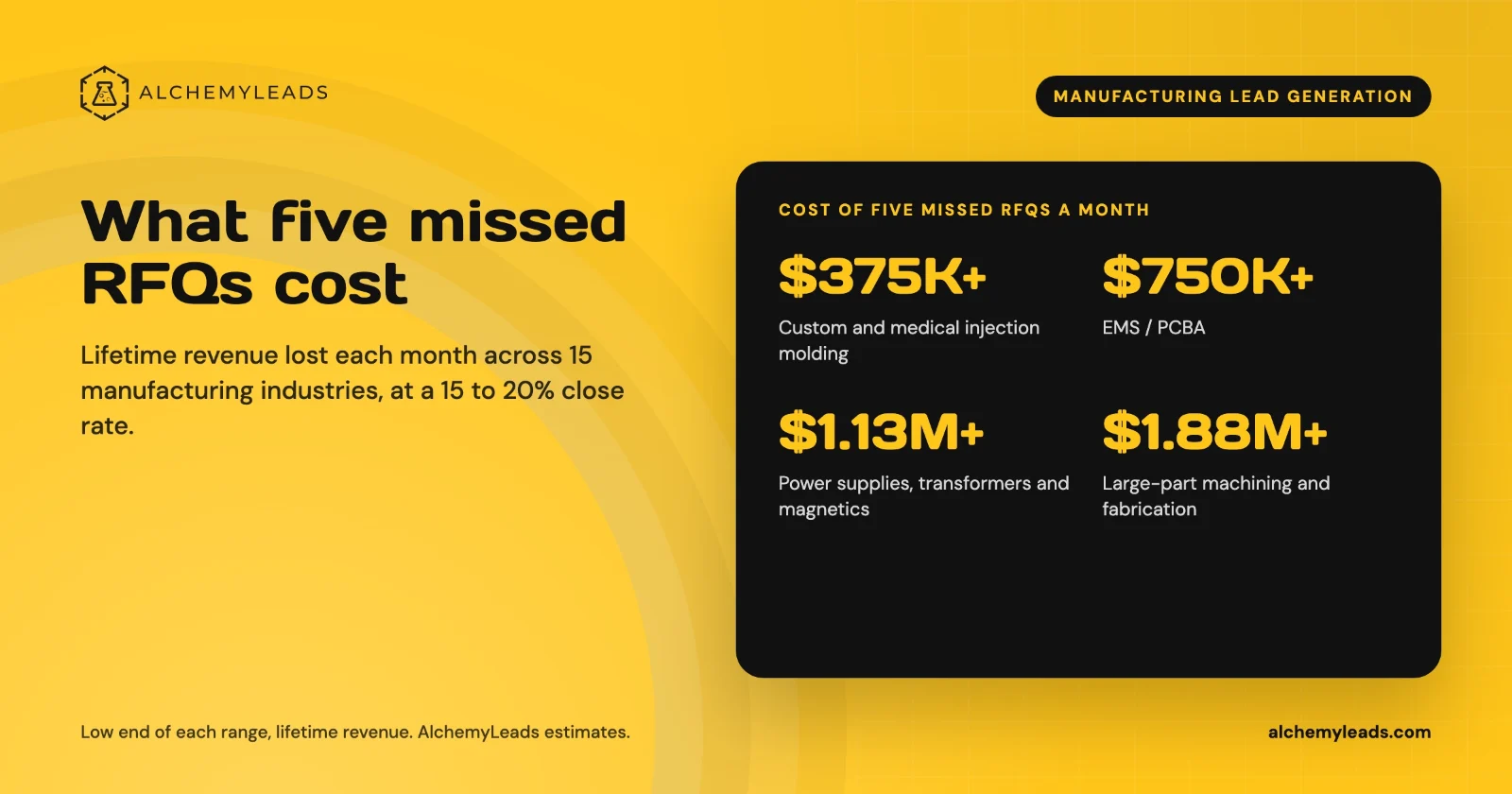
The Cost of Inaction in Manufacturing Lead Generation: What Five Missed RFQs a Month Cost in 15 Industries
What five missed RFQs a month cost in 15 manufacturing industries, with customer lifetime values, a conservative 15 to 20% close rate, and a cost of inaction calculator.
October 27, 2026

How to Get Cited by ChatGPT, Perplexity and Google AI Mode
How ChatGPT, Perplexity and Google AI Mode choose sources, which crawlers to allow, and a five-step plan to get your company cited, based on official docs.
October 26, 2026
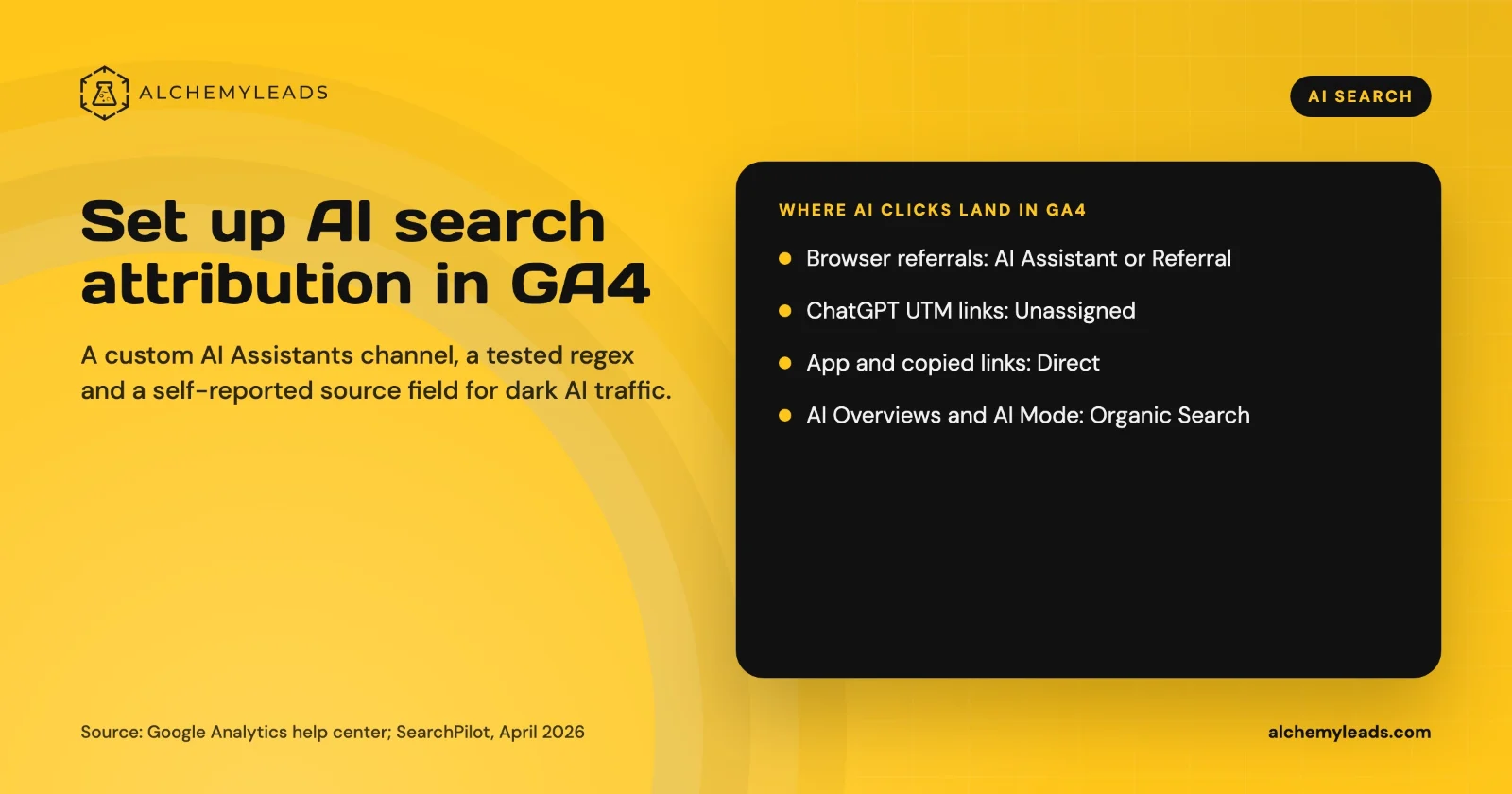
How to Set Up AI Search Attribution in GA4: A Step-by-Step Guide for 2026
Step-by-step GA4 setup for AI search attribution: an AI Assistants channel, a copy-paste regex, ChatGPT UTM fixes and a self-reported AI source field.
October 26, 2026
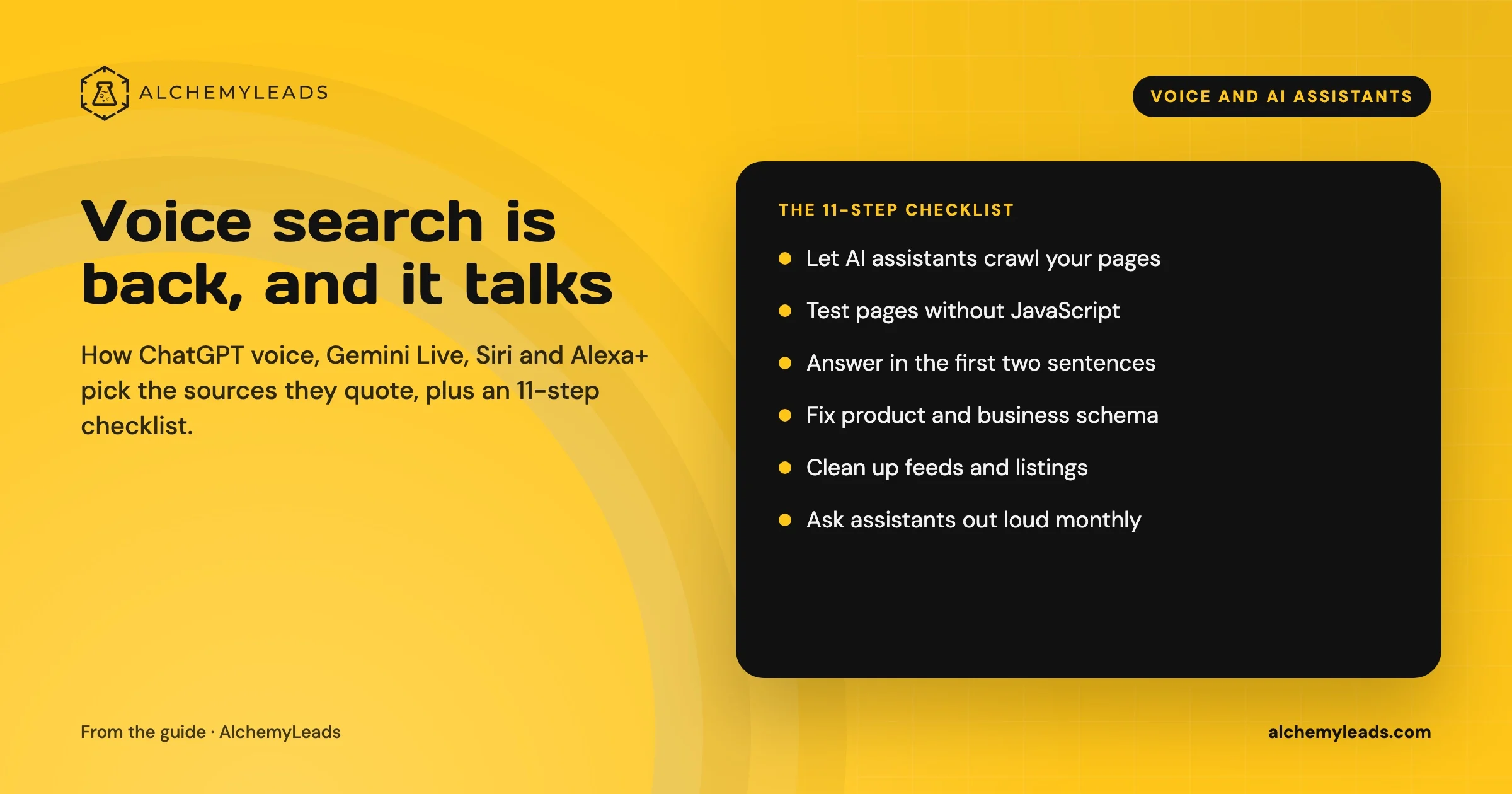
Voice Search in 2026: How AI Assistants Pick Their Sources
We first wrote about voice search in 2022, when the question was whether “Hey Siri” and “OK Google” would change how people shop. Four years later, voice is back in a bigger form. People now talk to ChatGPT, Gemini, Siri, Alexa+ and Copilot the way they talk to a knowledgeable friend, and those assistants answer by reading the web in
October 17, 2026
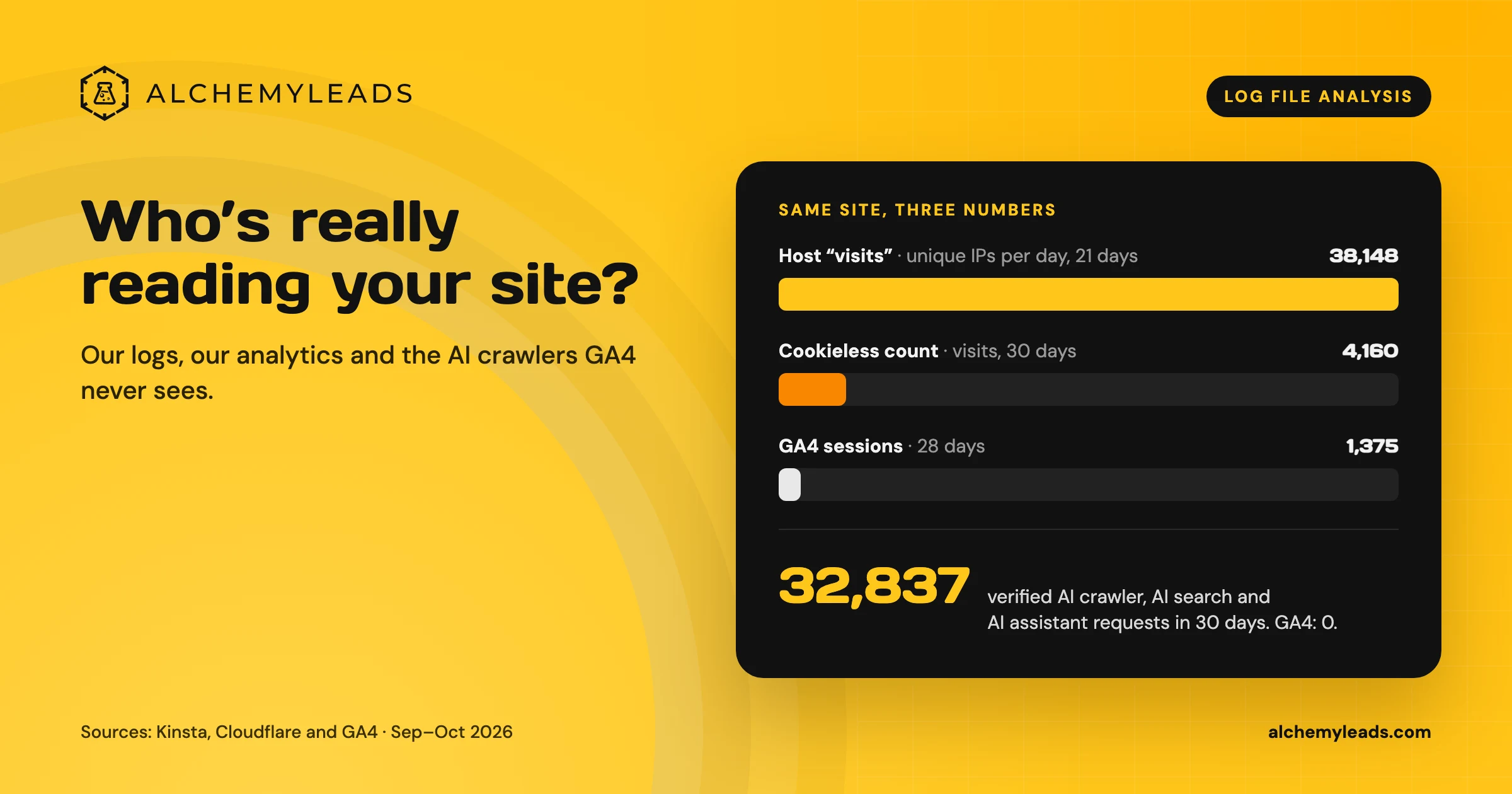
Log File Analysis for AI Search: Our Logs Showed 38,148 Visits. GA4 Showed 1,375.
Our host logged 38,148 visits. GA4 logged 1,375 sessions. We opened the server logs to see who was really there, and what AI crawlers read.
October 16, 2026
Contact us
We value your privacy and won't share your email with others.
We'll only contact you with curated content.
